News

Tropical Storm Erika Update

The below is something from UF’s Emergency Operations Team (EOT) that I thought would be good to forward to you all to get you thinking about things and reviewing your internal procedures related to a tropical storm/hurricane event for your unit.  Florida has gone about 10 years without a hurricane making landfall that impacts the state so we don’t have recent practice regarding action to take.

Fortunately, at this time it looks like we may just get some rain Monday night / Tuesday  from a category 1 hurricane sitting off the coast.  Things can always change; especially since the forecast track for north central Florida is 4-5 days out and subject to a lot of error.

I will most likely be getting additional updates each morning.  If this is something you’d like me to continue to forward let me know.  I have no plans on continuing to send the updates unless things change significantly and UF looks to be impacted more by this storm.

From: “Allen, Kenneth”
Date: Thursday, August 27, 2015 at 8:52 AM
To: “Allen, Kenneth”
Subject: EOT/Policy Group – Erika Update #2, Thursday AM (8/27)

Emergency Operations Team, Policy Group and Others – good morning. Much uncertainly remains regarding Tropical Storm Erika, especially as it relates to Florida. The computer models have generally shifted their tracks westward over the last several runs and the National Hurricane Center official forecast is now slightly east of Florida. Below are notes from the morning forecasts and attached are current graphics.

Erika Forecast

  • As of 8am, Tropical Storm Erika was poorly organized and located approximately 85 miles west of Guadeloupe (1,543 miles southeast of the UF Campus) with maximum sustained winds of 50 mph.
  • While Erika has strengthened overnight, conditions remain unfavorable for significant strengthening over the next 48 hours. If the storm survives these next 48 hours, it will encounter more favorable conditions for development.
  • Models remain in disagreement on Erika’s track beyond 2-3 days.
  • The official forecast moves turns the storm west-northwest today and continues this general path taking Erika near the Virgin Islands (later today), Puerto Rico (tonight) and Dominican Republic (Friday).
  • By Monday and Tuesday, the official forecast track has the center of Erika located approximately 85 miles off of the Florida East Coast as a category 1 hurricane.

UF Actions

  • With all of the Florida Peninsula now within the forecast error cone, UF units should monitor Erika for forecast changes and review their tropical weather plans.
  • The forecast track and strength of Erika is still too uncertain in the 3-5 day range to know if or to what extend impacts will be experienced within the state. Certainly an increasing threat for heavy rainfall at a minimum is a possibility.
  • Time frame for any potential impacts, if they were to occur, would begin in South Florida Sunday through Monday, moving northward. The Southeast Florida coast has a 30%-40% chance of experiencing tropical storm force winds on this morning’s forecast.
  • Information for the UF community is being regularly posted at http://www.ufl.edu/advisories/, which is prominently linked from the homepage. (This link is only active when required by a UF emergency.)
  • Current forecast updates are available from WRUF-TV’s live stream at 20 and 50 minutes past each hour: http://ufweather.org/watch (link is now invalid).
  • UF Emergency Management will be participating in briefings with local and state officials throughout the day.

If you have any questions or concerns, please let me know.

Thanks

-Kenneth

Kenneth Allen
University of Florida| Emergency Manager
Division of Public Safety| Department of Emergency Management
352-273-2100|kfallen@ufl.edu
www.emergency.ufl.edu
Windows 10 RSAT Available Now

I’ve downloaded and made available the remote server administrative toolkit for Windows 10 (32 and 64 bit) install MSIs to \\ad.ufl.edu\eg-adm\depot\apps\microsoft\  .  I added RSAT-WINDOWS-10 to the beginning of the filename so that it would be easy to identify.

I’ve installed and test it.  Works fine so far.  A reboot after install is required.

You could download it from the original location if desired:

http://www.microsoft.com/en-us/download/details.aspx?id=45520

Tagged as: , ,

New Version of Office for Mac Available

Mike has downloaded Microsoft Office for Mac Standard 2016.  It is available on our software depot: 

\\ad.ufl.edu\eg-adm\depot\apps\Microsoft 

Windows 10 Enterprise x64 ISO is also there in case you are interested.


Tagged as: , ,

Windows 10

EI&O has Windows 10 KMS servers in place and things are now activating.  As mentioned in previous meeting, use Windows 10 Enterprise.  Windows 10 Education is intended for the home use option for faculty,staff, student.  There are still issues with the KMS in the AHC secure zone.

Tagged as: , ,

“Unsupported UNIX Operating System” tickets

A number of you have pending “Unsupported UNIX Operating System” tickets (and consequently “Unsupported Web Server Detection” tickets) that have generated security ticket reminder messages today. Please make sure to address these tickets as soon as possible. Update them with the latest information and any planned actions for remediation/upgrade. Please include a date, or estimated date, you may have the ticket resolved if it isn’t already.

If you do not plan to upgrade the OS please include why and mention any security measures (technical or procedural controls) you have in place to protect the system. It may also be necessary to complete a security intake evaluation form for the system if you plan to keep the system in that state for a length of time.

The intake form and instructions can be found at https://security.ufl.edu/it-workers/risk-assessment/

Per UF security policies, systems are required to stay current. This means using current, vendor supported Operation Systems so that systems can continue to receive vital security patches. Systems not using current OSes are subject to being filtered from the network. In the past you’ve seen this happen with Windows XP and, most recently, with Windows Server 2003. Various Linux, and Unix, flavors that are no longer vendor supported sometimes can continue to be manually patched beyond vendor end-of-life dates. This is why you haven’t currently seen efforts to filter/block these systems from using the network. I believe it is only a matter of time, however, that there is a push to move forward with this (especially if tickets are not addressed in a timely manner).

Finally, it is important to note that the security intake form should be used when any new information system is brought online that is managed differently than other systems that have already been evaluated or that collects, contains, processes, or transfers any type of restricted data. As I’ve mentioned in the past, UF has been trying for years to make this intake/risk assessment process mandatory. It already is mandatory, by policy, in the Academic Health Center (AHC). We have seen various forms of new/updated risk assessment and data classification policies over the last two+ years but none of them, with the exception of the data classification policy, have really made it out of draft status. As a result, UF still operates under the old Risk Assessment Standard published at www.it.ufl.edu/policies/. The security intake form is an attempt to help units maintain compliance to this standard by having Information Security & Compliance evaluate and provide risk mitigation strategy reports for your information systems.

PGP and Encryption

Concerning PGP and UF’s mobile device encryption policy.

  • UF’s license for PGP is expiring in December. Remove it.
  • PGP will no longer be compliant to UF’s mobile device encryption policy.  Replace it.
  • UF’s official replacement is BitLocker (Windows) (Windows 8.1 or earlier devices will need to have a TPM chip), FileVault 2 (Mac), and Luks (Linux) when combined with the UFEM agent. Both are required.
  • There is a list of devices reporting to the PGP console (it took a bit to create because the console shows devices reporting since birth even if they haven’t reported again). Sent it to you yesterday.
  • UFIT has a team of temporary workers to help units migrate their encryption. To schedule talk to Tricia Cook (pkcook@ufl.edu).
  • UFIT encryption migration team has a set of procedures they use that we can share.  Look in ‘Shared Documents’ of the ENG-NET-MGRS UF Connect sharepoint site (link removed… no longer valid).
  • UFIT encryption migration team has backup software that was purchased that can backup PGP encrypted devices with a bitwise copy of the encrypted drive.  Casper Secure Drive Backup. Info below.
  • MIS is testing the UFIT’s encryption migration teams processes and backup software.  We will let you know how it goes at next ENG-IT meeting.
  • We will be migrating encryption for own user base (BME, CHE, EG-ADM, and ISE) first.  After we test and address our users we can assist in your units if you would like.

Finally, in the past PGP was announced as available for UF employee home use.  This also goes away.  I don’t really know what UF is proposing for personally owned computers as it pertains to compliance to UF policies concerning encryption.  Time to ask this question.

Tagged as: ,

Encrypted Emails (Yep! It does exist)

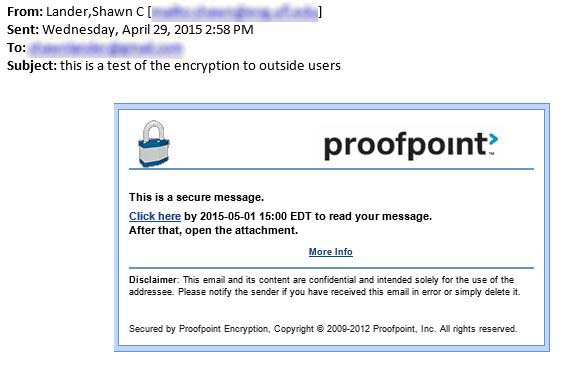
How many of you are familiar with this feature within UFX?  Put [encrypt] at the start of your email subject and if the message is to someone outside of UF, proofpoint will encrypt the email via an internal service. Below is an example to show what it looks like. Additionally, URL from the HelpDesk wiki (below) explains it a little more.  We don’t know much about the ‘Proofpoint Encryption Premium Plug-in’ mentioned yet.

https://wiki.helpdesk.ufl.edu/FAQs/SecureEmailEncryptionWithProofpoint (this link no longer works and has been deactivated)

Additionally, this does not work between UFX users (not sure if it works UFX to O365 either).  My thought there is since it stays internal to UF that encryption doesn’t happen because the message doesn’t go through Proofpoint. It probably isn’t necessary to be encrypted either since it stays internal to UFX.  I’m not sure what happens for a UFX user to a third party email server on campus (UFX to ECE.UFL.EDU for instance).

encrypted-email-via-proofpoint

Tagged as: ,

Unknown Issues Causing Problems with Network Drives

Several CHE and ISE network drives may currently be inaccessible due to issues with the hosting infrastructure at Enterprise Infrastructure & Operations (EIO). EIO is aware of the issue and is currently working on it. I do not yet have an estimate on when services will be restored. This is impacting several units on campus that have their hosting on the affected storage cluster.

As news becomes available I will make sure to send additional information if it looks like the downtime will be extended. Otherwise expect my next email after I’m able to confirm that everything is back.

If you have questions or comments please call 392-9217 or email mis@eng.ufl.edu.

UPDATE1 (@4PM 2015-04-10): As of 4:00pm services are restored.

UPDATE2 (@9AM 2015-04-13): UFIT has released a statement regarding Friday’s downtime.

On Friday afternoon, April 10,  UFIT worked an incident that had wide-spread impact; so I’d like to give you the details:

About 3:15 PM Friday the UF Computing Help Desk began receiving calls about MediaSite being unavailable. Within a few minutes it was apparent that the problem was major, so the Help Desk notified UFIT’s Video Services and Operations groups.

The Operations group contacted appropriate personnel who quickly realized that the problem was with the Isilon storage system.  Specifically that the Master Control Process on the cluster was hung and consuming 100% CPU capacity. UFIT staff immediately engaged EMC technical support so they might see the problem “live.”  At the suggestion of a UFIT sysadmin, EMC killed that process at roughly 3:30 PM; at which point the Isilon storage server began functioning normally.

The outage lasted about 15 minutes, from 3:15 PM – 3:30 PM.

It should be noted that other services were affected, including UFirst and Network Shared Drives, though only MediaSite problems were reported to the Help Desk.    UFIT and EMC are now investigating to determine what caused the MCP process to tie up 100% CPU utilization on the cluster, and to implement appropriate monitoring (short term) and ultimately resolve this problem (longer term, unknown duration). 

If you have any questions or comments about this incident, please let me know.

Bah Humbug! Lost Functionality in Exchange 2013

So.  A while back I emailed a tip to everyone about how we noticed that the ‘Sent-Items’ folders of shared mailboxes never had anything in them.  In other words, when you have permission to a shared-mailbox and you responded to a message in the shared-mailbox as the shared-mailbox the message you sent would end up in your ‘Sent-Items’ folder and not the ‘Sent-Items’ folder of the shared mailbox.  The tip was a way to fix this and have that sent message go where you want it to.

Well… that tip doesn’t work anymore in Exchange 2013.  Microsoft took those cmdlets away.  Apparently the setting continues to work if it was set prior to the mailbox being migrated to Exchange 2013.  Additionally, the workstation registry hack for Outlook continues to work but is an inelegant way of doing things.

We are currently at Exchange 2013 CU7.  Apparently in Exchange 2013 CU9 the default behavior of a shared mailbox will be that when a message is sent from a shared mailbox, the sent message will be stored in the sent folder in the shared mailbox.  Microsoft will also introduce new argument to set-mailbox to change this behavior:

Set-mailbox –MessageCopyForSentAsEnabled [$True/$False]
Set-mailbox –MessageCopyForSendOnBehalfEnabled [$True/$False]

So.  We lost functionality and won’t get it back until CU9 is applied.

Tagged as: ,

UFAD Reorg Date: April 14th at 10am

Barring any unforeseen problems the date that the PEOPLE side changes for our UFAD OU structure will go into effect is Tuesday, April 14th.  At 10am Enterprise Infrastructure & Operations will update the directory sync scripts and then Identity Access Management will kick off the scripts that remove NMBs and reassign them.  The IAM scripts will be the process that makes sure everyone trickles to their correct OU. There will be an expected 30 min to 1 hr timeframe for this sync to complete.

After maintenance is completed user objects should be found in the new OUs.  Since NMBs are being reassigned the start dates for all NMBs will be April 14th and there will be no end date assigned.

I will be providing IAM the list of UFID to NMB assignments at 4pm on Monday, April 13th.  Any NMB changes you make between this time and the completion of the following morning’s work will not be made.  It would be best to not perform NMB assignments until the completion of this maintenance.

Possible things to watch out for that have previously been mentioned:

  • Use of OU Autogroups.
  • GPO links on PEOPLE side
  • Query-based distribution groups which target OUs
  • Any custom scripts that target OUs.
  • Dependence on a set NMB end-date.

EIO is currently reviewing the autogroup scripts to insure that the new OUs will receive their corresponding autogroups.  Additionally, the delegation of permissions will be completed this afternoon.

The old OUs will be deleted at a future date.

If you have questions about this maintenance please let me know.

Tagged as: