News

Info regarding vulnerability notices for ‘SSL Certificate Signed Using SHA-1 Algorithm’

Starting last week we saw a new vulnerability notice for ‘SSL Certificate Signed Using SHA-1 Algorithm’.  The entire college is getting hit by this one A LOT.  After doing some investigation into this it turns out that most, if not all, Windows machines with remote desktop services turned on will be generating this notice because of the SHA-1 certificates in use by Microsoft and UFAD.

From what I can tell there is nothing that we can do for this particular vulnerability notice until Microsoft releases new SHA-2 certificates and patches their products.  As such, I reached out to Information Security & Compliance for guidance. They have stated that they will try to create an exception for RDP/SHA-1 certificate discovery.

Hopefully an exception will be possible and it will lessen the noise we see from this particular notice.

The intent of this notice is to make us aware of website SSL certificates that we can upgrade to SHA-2 encryption.  If you do find something that has a SHA-1 SSL certificate generate a new CSR and send the request to certificates@eng.ufl.edu so we can generate a new certificate for you.  Please follow the directions listed at:

https://connect.ufl.edu/eng/admin/eng-net-mgrs/Wiki/SSL%20Certificate%20Requests.aspx (no longer valid)

Tagged as: ,

VoIP Handsets Being Installed for EG-ADM

Early this morning we were surprised to find that UFIT Network Services began deploying CISCO VoIP handsets (the new phones) to Engineering Administration (EG-ADM).  The work began with offices on the 2nd floor of Weil Hall (Safety, Facilities, Student Affairs, Processing, etc). Network Services intent was to deploy in select areas on the 3rd floor of Weil tomorrow (avoiding the Dean’s Office suite (Weil 300/310/312) and Development Office (Weil 330/339/350)) and finish the deployment to those remaining areas this Sunday.

We are requesting that Network Services push this back and deploy entirely during the Sunday maintenance window or later.  We want Network Services to avoid deployments tomorrow because of the event planned for Thursday.

Deployment of the new handsets does not mean that we are migrating at this time.  You will simply have an additional handset on your desk.  The old phone system will continue to operate as it normally has.

New handsets are deployed so that you can familiarizing yourself with the features and operation of these devices before the actual migration.  A training class will also be scheduled soon to teach you how to use them.  At a later date, after the training, a migration date will be scheduled.  After migration the VoIP handsets will take over and the old phones will be pulled from your desks.  In other words, your old extensions will be gone and be replaced by the phone numbers associated with the VoIP handsets.

You can find some additional instructional and informational guides on Telecommunications website at https://it.ufl.edu/ict/documentation/telecommunications/instructional–informational-guides/.

If you have questions about this process please email mis@eng.ufl.edu or call 392-9217.

-MIS

PS: The VoIP handsets being deployed now still have some programming left to be completed. For instance, we know that auto-attendents are not recorded and voicemail is not configured.  Additionally, placeholder phone numbers are on some handsets in order to leave your published phone numbers in the old phone system.

Tagged as: ,

UFIT Proposed Service: GitHUB

I know we have a number of GIT installations around the College.  If campus was to set one up centrally and open it up to all of UF (for no charge backs) for your use would you use it for your projects?  There’s a bigger question here:

  • If you run your own, would you transition/migrate to a UFIT GitHUB installation?
  • If you don’t currently run GitHUB (but some other version control / source code management system), would you switch to UFIT GitHUB install?
  • What would be your barriers to entry of a UFIT GitHUB install?

Does this interest any of you at all? If not interested, and you run a local install of GIT, why not?

I believe this will be an open topic of conversation at the next IT@UF meeting.  Would you be willing/wanting to attend to add your perspective to this project?


Tagged as: ,

Tropical Storm Erika Update

The below is something from UF’s Emergency Operations Team (EOT) that I thought would be good to forward to you all to get you thinking about things and reviewing your internal procedures related to a tropical storm/hurricane event for your unit.  Florida has gone about 10 years without a hurricane making landfall that impacts the state so we don’t have recent practice regarding action to take.

Fortunately, at this time it looks like we may just get some rain Monday night / Tuesday  from a category 1 hurricane sitting off the coast.  Things can always change; especially since the forecast track for north central Florida is 4-5 days out and subject to a lot of error.

I will most likely be getting additional updates each morning.  If this is something you’d like me to continue to forward let me know.  I have no plans on continuing to send the updates unless things change significantly and UF looks to be impacted more by this storm.

From: “Allen, Kenneth”
Date: Thursday, August 27, 2015 at 8:52 AM
To: “Allen, Kenneth”
Subject: EOT/Policy Group – Erika Update #2, Thursday AM (8/27)

Emergency Operations Team, Policy Group and Others – good morning. Much uncertainly remains regarding Tropical Storm Erika, especially as it relates to Florida. The computer models have generally shifted their tracks westward over the last several runs and the National Hurricane Center official forecast is now slightly east of Florida. Below are notes from the morning forecasts and attached are current graphics.

Erika Forecast

  • As of 8am, Tropical Storm Erika was poorly organized and located approximately 85 miles west of Guadeloupe (1,543 miles southeast of the UF Campus) with maximum sustained winds of 50 mph.
  • While Erika has strengthened overnight, conditions remain unfavorable for significant strengthening over the next 48 hours. If the storm survives these next 48 hours, it will encounter more favorable conditions for development.
  • Models remain in disagreement on Erika’s track beyond 2-3 days.
  • The official forecast moves turns the storm west-northwest today and continues this general path taking Erika near the Virgin Islands (later today), Puerto Rico (tonight) and Dominican Republic (Friday).
  • By Monday and Tuesday, the official forecast track has the center of Erika located approximately 85 miles off of the Florida East Coast as a category 1 hurricane.

UF Actions

  • With all of the Florida Peninsula now within the forecast error cone, UF units should monitor Erika for forecast changes and review their tropical weather plans.
  • The forecast track and strength of Erika is still too uncertain in the 3-5 day range to know if or to what extend impacts will be experienced within the state. Certainly an increasing threat for heavy rainfall at a minimum is a possibility.
  • Time frame for any potential impacts, if they were to occur, would begin in South Florida Sunday through Monday, moving northward. The Southeast Florida coast has a 30%-40% chance of experiencing tropical storm force winds on this morning’s forecast.
  • Information for the UF community is being regularly posted at http://www.ufl.edu/advisories/, which is prominently linked from the homepage. (This link is only active when required by a UF emergency.)
  • Current forecast updates are available from WRUF-TV’s live stream at 20 and 50 minutes past each hour: http://ufweather.org/watch (link is now invalid).
  • UF Emergency Management will be participating in briefings with local and state officials throughout the day.

If you have any questions or concerns, please let me know.

Thanks

-Kenneth

Kenneth Allen
University of Florida| Emergency Manager
Division of Public Safety| Department of Emergency Management
352-273-2100|kfallen@ufl.edu
www.emergency.ufl.edu

Windows 10 RSAT Available Now

I’ve downloaded and made available the remote server administrative toolkit for Windows 10 (32 and 64 bit) install MSIs to \\ad.ufl.edu\eg-adm\depot\apps\microsoft\  .  I added RSAT-WINDOWS-10 to the beginning of the filename so that it would be easy to identify.

I’ve installed and test it.  Works fine so far.  A reboot after install is required.

You could download it from the original location if desired:

http://www.microsoft.com/en-us/download/details.aspx?id=45520

Tagged as: , ,

New Version of Office for Mac Available

Mike has downloaded Microsoft Office for Mac Standard 2016.  It is available on our software depot: 

\\ad.ufl.edu\eg-adm\depot\apps\Microsoft 

Windows 10 Enterprise x64 ISO is also there in case you are interested.


Tagged as: , ,

Windows 10

EI&O has Windows 10 KMS servers in place and things are now activating.  As mentioned in previous meeting, use Windows 10 Enterprise.  Windows 10 Education is intended for the home use option for faculty,staff, student.  There are still issues with the KMS in the AHC secure zone.

Tagged as: , ,

“Unsupported UNIX Operating System” tickets

A number of you have pending “Unsupported UNIX Operating System” tickets (and consequently “Unsupported Web Server Detection” tickets) that have generated security ticket reminder messages today. Please make sure to address these tickets as soon as possible. Update them with the latest information and any planned actions for remediation/upgrade. Please include a date, or estimated date, you may have the ticket resolved if it isn’t already.

If you do not plan to upgrade the OS please include why and mention any security measures (technical or procedural controls) you have in place to protect the system. It may also be necessary to complete a security intake evaluation form for the system if you plan to keep the system in that state for a length of time.

The intake form and instructions can be found at https://security.ufl.edu/it-workers/risk-assessment/

Per UF security policies, systems are required to stay current. This means using current, vendor supported Operation Systems so that systems can continue to receive vital security patches. Systems not using current OSes are subject to being filtered from the network. In the past you’ve seen this happen with Windows XP and, most recently, with Windows Server 2003. Various Linux, and Unix, flavors that are no longer vendor supported sometimes can continue to be manually patched beyond vendor end-of-life dates. This is why you haven’t currently seen efforts to filter/block these systems from using the network. I believe it is only a matter of time, however, that there is a push to move forward with this (especially if tickets are not addressed in a timely manner).

Finally, it is important to note that the security intake form should be used when any new information system is brought online that is managed differently than other systems that have already been evaluated or that collects, contains, processes, or transfers any type of restricted data. As I’ve mentioned in the past, UF has been trying for years to make this intake/risk assessment process mandatory. It already is mandatory, by policy, in the Academic Health Center (AHC). We have seen various forms of new/updated risk assessment and data classification policies over the last two+ years but none of them, with the exception of the data classification policy, have really made it out of draft status. As a result, UF still operates under the old Risk Assessment Standard published at www.it.ufl.edu/policies/. The security intake form is an attempt to help units maintain compliance to this standard by having Information Security & Compliance evaluate and provide risk mitigation strategy reports for your information systems.
PGP and Encryption

Concerning PGP and UF’s mobile device encryption policy.

  • UF’s license for PGP is expiring in December. Remove it.
  • PGP will no longer be compliant to UF’s mobile device encryption policy.  Replace it.
  • UF’s official replacement is BitLocker (Windows) (Windows 8.1 or earlier devices will need to have a TPM chip), FileVault 2 (Mac), and Luks (Linux) when combined with the UFEM agent. Both are required.
  • There is a list of devices reporting to the PGP console (it took a bit to create because the console shows devices reporting since birth even if they haven’t reported again). Sent it to you yesterday.
  • UFIT has a team of temporary workers to help units migrate their encryption. To schedule talk to Tricia Cook (pkcook@ufl.edu).
  • UFIT encryption migration team has a set of procedures they use that we can share.  Look in ‘Shared Documents’ of the ENG-NET-MGRS UF Connect sharepoint site (link removed… no longer valid).
  • UFIT encryption migration team has backup software that was purchased that can backup PGP encrypted devices with a bitwise copy of the encrypted drive.  Casper Secure Drive Backup. Info below.
  • MIS is testing the UFIT’s encryption migration teams processes and backup software.  We will let you know how it goes at next ENG-IT meeting.
  • We will be migrating encryption for own user base (BME, CHE, EG-ADM, and ISE) first.  After we test and address our users we can assist in your units if you would like.

Finally, in the past PGP was announced as available for UF employee home use.  This also goes away.  I don’t really know what UF is proposing for personally owned computers as it pertains to compliance to UF policies concerning encryption.  Time to ask this question.

Tagged as: ,

Encrypted Emails (Yep! It does exist)

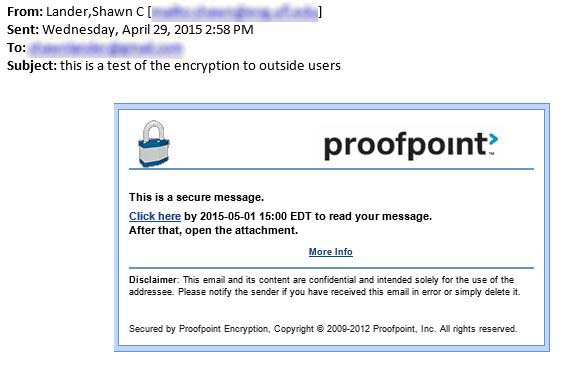
How many of you are familiar with this feature within UFX?  Put [encrypt] at the start of your email subject and if the message is to someone outside of UF, proofpoint will encrypt the email via an internal service. Below is an example to show what it looks like. Additionally, URL from the HelpDesk wiki (below) explains it a little more.  We don’t know much about the ‘Proofpoint Encryption Premium Plug-in’ mentioned yet.

https://wiki.helpdesk.ufl.edu/FAQs/SecureEmailEncryptionWithProofpoint (this link no longer works and has been deactivated)

Additionally, this does not work between UFX users (not sure if it works UFX to O365 either).  My thought there is since it stays internal to UF that encryption doesn’t happen because the message doesn’t go through Proofpoint. It probably isn’t necessary to be encrypted either since it stays internal to UFX.  I’m not sure what happens for a UFX user to a third party email server on campus (UFX to ECE.UFL.EDU for instance).

encrypted-email-via-proofpoint

Tagged as: ,