News

UFAD Reorganization Update

Once again time to share where we are on this project.  We are in the home stretch.

Attached is the latest spreadsheet of what is happening with the reorg.  It differs from the last one I sent in that I’ve added delegation groups for AD and UFX.  There are also notes regarding what needs to happen at the bottom of the sheet.   On Thursday these delegation group changes will happen (renames and permissions granted).  Unfortunately the new permissions won’t be that useful since it’ll be granted on the new OUs (and people objects haven’t moved yet).

I’ve asked before and remember that these groups were not being used in scripts or shib arp authentication so these renames shouldn’t be an issue.  However, if you do notice something off late Thursday or after and it has to do with one of these groups it may be because of a rename.  Permissions are being added; they are not being removed from existing OUs (so you won’t lose any existing access you have to your current OUs).

Thursday afternoon I will also be meeting with Identity Access Management to finalize the date/time that they can handle our NMB touches.  I’ve considered many different ways to handle the NMB touches to make sure people move appropriately.  In the end the best way to handle this is to work off UFAD data instead of trying to get data out of the directory.  The day the NMB touch is to be done I will be dumping current data from UFAD, running it through my processes to create a list of UFID to NMB assignments and supplying it to IAM.  If people exist in your old OUs they will exist in your new OUs.  Where an old OU is being done away with the NMB will be assigned based on the below crosswalk.  You will then be able to use the DEPTIDs in the spreadsheet to move people about as you desire.

If you have questions please let me know.  I will let you all know the scheduled date of the NMB assignments change and IAM touch after my Thursday meeting.

CROSSWALK
ID CURRENT-OU NEW-NMB NEW-OU
1 CCE 19040000 ESSIE->CCE
3 CHE 19030000 CHE
4 EG-AA 19010200 EG-ADM->EG-AA
5 EG-ADM 19010000 EG-ADM
6 EG-BIOMEDICAL 19340000 BME
7 EG-BIOMEDICAL ENGINEERING 19340000 BME
8 EG-CIVIL AND COASTAL 19040000 ESSIE->CCE
9 EG-COMPUTER – INFO SCI & ENG 19140000 CISE
10 EG-DEANS 19010100 EG-ADM->EG-DEANS
11 EG-DEVELOPMENT 19011700 EG-ADM->EG-DEVELOPMENT
12 EG-DSA 19010300 EG-ADM->EG-DSA
13 EG-EDGE 19010400 EG-ADM->EG-EDGE
14 EG-EES 19100000 ESSIE->EES
15 EG-ELECTRICAL – COMPUTER ENG 19050000 ECE
16 EG-ESSIE 19070000 ESSIE
17 EG-FACILITIES 19011300 EG-ADM->EG-FACILITIES
18 EG-FESC 19380000 CHE->FESC
19 EG-FL CTR SOLID HAZ WASTE MGMT 19070300 ESSIE->HCSHWM
20 EG-FL TRANSPORT TECHNOLOGY CTR 19220300 ESSIE->T2
21 EG-FNP 19010800 EG-ADM->EG-FINANCE
22 EG-GEOMATICS 19220300 ESSIE->T2
23 EG-GRAD ENG – RES CTR 19120000 MAE->REEF
24 EG-GRAD ENGINEERING – RES CTR 19120000 MAE->REEF
25 EG-INDUSTRIAL – SYSTEMS ENG 19060000 ISE
26 EG-MATERIALS SCI ENGINEERING 19090000 MSE
27 EG-MECH AND AERO 19020000 MAE
28 EG-MECHANICAL – AEROSPACE ENG 19020000 MAE
29 EG-MIS 19011200 EG-ADM->EG-MIS
30 EG-NUCLEAR – RADIOLOGICAL 19090000 MSE
31 EG-NUCLEAR – RADIOLOGICAL ENG 19080000 RSC->UFTR
32 EG-PNP 19010900 EG-ADM->EG-PERSONNEL
33 EG-PROC 19011000 EG-ADM->EG-PROCESSING
34 EG-PUBS 19011500 EG-ADM->EG-MARCOM
35 EG-REACTOR TRAINING 19080000 RSC->UFTR
36 EG-RGP 19010600 EG-ADM->EG-RESEARCH
37 NIMET 19221100 RSC->MAIC
38 PERC 19330100 RSC->PERC

Tagged as:

Weil Wallplate Migration Caused Some Problems

This past weekend the 3rd floor telecommunications closets in Weil Hall were migrated to wallplate.  We are seeing residual issues with the migration where workstations are not successfully obtaining network addresses and, consequently, not able to do anything on the network (in some cases not even able to log in).  If you, or a colleague, have any of these issues please let us know.  Network Engineers from UFIT have already been contacted and are already working on the issue.  The lead tech is on his way to Weil Hall now.

Tagged as: ,

Move of ISE Shared Data Drive (S:\) Tonight!

In January MIS sent an email with subject ‘Required Workstation Changes Incoming for ISE’.  This email described a migration plan for ISE data to new storage. Our initial plan was to address all personal home directories before migrating the shared data drive (S:\).  However, due to some recent communication with Enterprise Infrastructure & Operations (EI&O) we are accelerating our move of the shared data drive (S:\).  Due to the possibility of failure and data loss in the old location we are no longer waiting and will be moving the S:\ drive tonight.

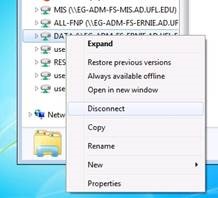
network-drives-disconnectFor the most part this will be a transparent change.  Beginning at about 5:15PM tonight we will remove access to the S:\ drive and begin the data migration (copying of the data and any remaining changes should take between 3-6 hours). Tomorrow morning, when you login, the drive mapping should be updated by our policies and direct you to the new location.  In odd instances this does not happen automatically and it will require you to manually disconnect your S:\ drive.  Remember, you do have to log out and in for this to occur.

Disconnecting your S:\ drive is rather simple.  To disconnect, right-click on the S:\ drive within Windows Explorer and choose ‘Disconnect’ from the resulting context menu (as shown in the picture below).  Even without disconnecting, policies we have in place should update your mapped drive.

Rest assure, any remaining data at the old location will also be backed up to offline storage tomorrow in case there are any issues before we are able to migrate all user home directories/folders.  If you are among the users that still have a personal home directory in the old location you would have received an email from Mike (copied below).  We would appreciate it if you can work with us as soon as possible.

Thank you.


-MIS


PS: For those not using a Microsoft Windows workstation that does not receive our policies.  The network drive is changing as below:


OLD LOCATION: \\cns-ise-fs01.ad.ufl.edu\data\

NEW LOCATION (FULL PATH): \\osg-prod.cns-fs04.osg.ufl.edu\ise\DATA

NEW LOCATION (DFS PATH): \\ad.ufl.edu\ise\DATA

UF Exchange Migration

On Wednesday, February 25th UFIT will be performing maintenance on College of Engineering user mailboxes. Mailboxes will be migrated to the new Exchange 2013 infrastructure. For the most part this change should be transparent to you (you will notice that your Outlook Web Access (OWA) client has a new look).

We have noticed connection problems after the migration with some ActiveSync (smartphones and tablets) and Outlook Anywhere (off-campus installs of Outlook) connections. If you have problems connecting to your mailbox sometime on or after Wednesday afternoon this may be the issue. To correct, simply delete your account settings and reconnect to Exchange. You can always contact MIS to assist you in this process.

If you have questions or comments please email mis@eng.ufl.edu.

Tagged as: , ,

PGP Certificate Errors

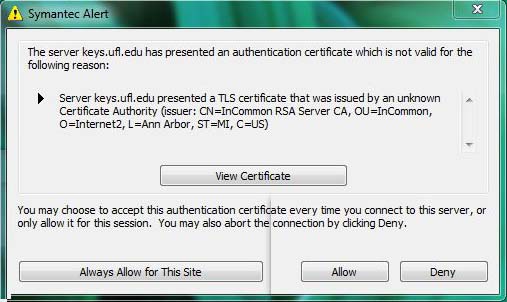
For those of you that use a PGP encrypted laptop you may have been seeing errors after last weekend. The security certificate on the PGP server expired and was replaced. For an unknown reason it is not recognized as valid. As a result, users are reporting seeing a certificate expired error message after login with options to “View Certificate,” “Always Allow for This Site”, “Allow”, and “Deny” as seen in the below screenshot. You will want to select “Always Allow for This Site”.

PGP Certificate Error

At this time it is unknown how long this may persist. UFIT is attempting to figure out why the PGP console considers the certificate invalid and will implement a fix when one is discovered. For now, simply clicking “Always Allow for This Site” will prevent the alert from appearing again. This will have to be done on each device you use that is PGP encrypted.

If you have questions or comments please email mis@eng.ufl.edu.

Tagged as: ,

DNS Server Changes

Engineering Administration has completed our transition to UFIT Infoblox servers for DNS and DHCP.  Any forward/reverse DNS zones and any scopes/superscopes for DHCP have been migrated.  We will be doing some analysis of our name servers to determine if / how they are still used and announce a more formal end-of-life date for them that is appropriate to the amount of use they still receive.

For the most part we have been encouraging users NOT to use our name servers in their DHCP scope options or in other configurations for name servers.  If you have been using 128.227.116.4 or 128.227.116.5 please discontinue use.  Servers that you should be using include:

Read More

Tagged as: , ,

Migration of K:\ Drive to New Server

Some offices within Engineering Administration already know that we are in the process of migrating our network drives to a new server.  We will be migrating portions of the K:\ drive (APPS and EVERYONE folder) tonight, May 28th, and updating the drive mapping to the new server.

This maintenance will start at approximately 5:15PM be done by approximately 6:00PM. Tomorrow morning when you login the drive mapping should be updated by our policies and direct you to the new location.  In rare instances this does not happen automatically and require you to manually disconnect your K:\ drive.  Remember, you do have to log out and in for this to happen.network-drives-disconnect

Disconnecting your K:\ drive is rather simple. To disconnect, right-click on the K:\ drive within Windows Explorer and choose ‘Disconnect’ from the resulting context menu (as shown in the picture below). Even without disconnecting policies should update your mapped drive.

For the majority of Engineering Administration this will be a transparent change (you won’t even notice it) in preparation for the migration of the remaining office folders (I:\ drives).  However, individuals that access office folders through the K:\ drive will likely lose this ability until the remaining office folders (I:\ drives) are migrated.

The K:\ drive is being remapped from \\eg-adm-fs-bert.ad.ufl.edu\data\ to \\ad.ufl.edu\eg-adm\data\. If you need access to the old location you should be able to click the link above.  If this is something you will need regularly prior to the completion of our migration we can help you map a drive to the old location.

If you have questions please let me know.


Welcome to WWW.IT.ENG.UFL.EDU

Welcome to the IT support site for the College of Engineering. This site is being launched to contain information and news for units supported the College of Engineering. It also includes a helpdesk/ticketing system which will can be used to request and track help.

On the front page you can use the “Subscribe to IT News” to get an email notice whenever new posts are made here. Posts made on this website will be used to draw attention to UFIT or College changes in IT procedures, policies, or services.