The Jamf Connect Menu is an additional feature of Jamf Connect that works in tandem with Jamf Connect Login. For most users, it will not be necessary to interact with this feature so this article serves mostly to provide additional information and help for troubleshooting if needed.
Successful Migration
If you have successfully completed the migration process and log in via Jamf Connect Login then you will be able to find the Jamf Connect Menu in the upper right corner of the macOS desktop.

It looks like a small UF logo. If you click the icon you will see a drop down menu as seen below
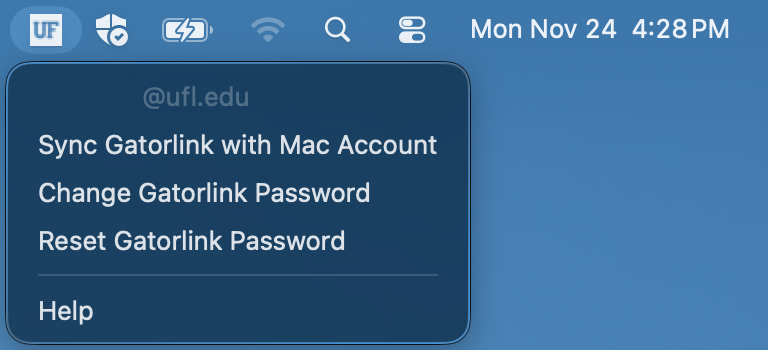
In the menu, you should see your full Gatorlink User ID grayed out at the very top of the menu. This is normal and indicates that Jamf Connect is working as expected.
Menu Options
Clicking on the ‘Sync Gatorlink with Mac Account’ option while connected to the internet will immediately update the password of the Mac account you are currently using to your current Gatorlink password.
This process runs automatically any time you log into your Mac account using Jamf Connect Login.
The only time you should run this process manually is after Changing or Resetting your Gatorlink Password using the convenient links in the menu.
The ‘Help’ button opens to this article and if you need further assistance you can submit a ticket by clicking here or the button to the right.
Migration Bypass
If you do not have an active internet connection and log in to your Mac computer using your credentials then you will be greeted by the window below.
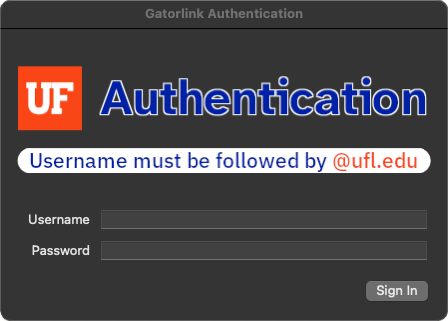
This window cannot be closed until you sign in with your Gatorlink username@ufl.edu and password with an active internet connection. If your Mac account’s password is different from your current Gatorlink password then you will be prompted with another window as seen below.
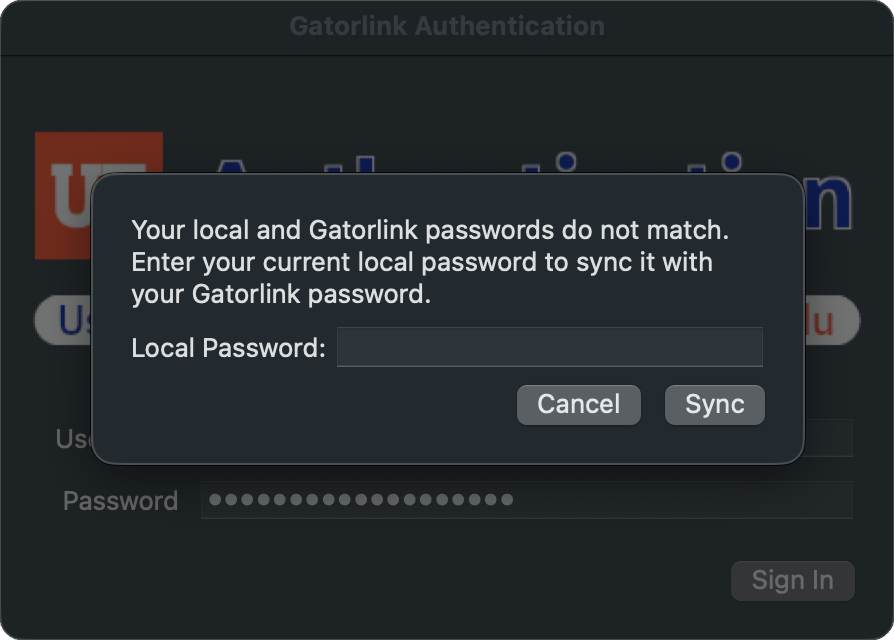
Your local password is the same password you used to log into the Mac account without an internet connection. After you enter your Mac account’s password and click ‘Sync’ then your password will be changed to your current Gatorlink Password.
This is NOT the same as account migration which must be performed as soon as possible to prevent potentially losing access to your Mac account.