News
External Email Banner
As of today, some of your email might look a little different. UFIT has implemented a banner to all emails originating from off-campus. The banner, which will be prepended to the body of the email, reminds people to be suspicious before following any link, or opening any attachment, they receive in email.

Although this banner will only be attached to emails originating from off-campus mail services, please remember that you should always use caution before opening any link or attachment you receive in email, no matter where it came from. The vast majority of phishing emails we receive at this time are from compromised UF accounts. As a result, they will not have this banner applied.
The banner serves as an extra layer of awareness for faculty, students, and staff to be vigilant when opening external emails and attachments. It will not be added to email originating from UF, Shands, and Shands-Jax email systems. UFIT is also preemptively whitelisting incoming email from organizations with established business relationships supporting the academic, research, and health/outreach mission of the university. Additional exemptions for official business email will be considered. Anyone with questions about the external email banner or the instructions for requesting an exemption may contact their unit IT or the UF Computing Help Desk.
References:
https://news.it.ufl.edu/infrastructure/additional-safeguard-external-email-banner-for-uf-email (UFIT News article expired and was removed October 2022)
https://it.clas.ufl.edu/article/external-email-banners/
Protecting Against Zoom Exploit Hijacking Webcams on MacOS
A current flaw in the Zoom app for Mac allows a website to open the webcam without user permission. Until this gets fully resolved, the instructions below remain the best solution. Disabling of the web server component of the Zoom app, as well as a small piece of tape or paper obstructing your device’s webcam are also suitable. This post is to educate our users on how they can prevent a current Zoom exploit from taking over their webcam on their Mac. Instructions for an interim solution are as follows:
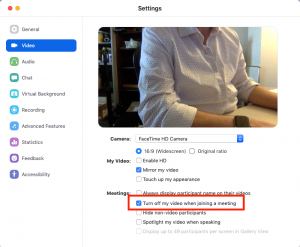
Login to the Zoom app and click the blue Gear in the upper, right-hand corner. Then, click on “Video” on the left, and then tick the box for “Turn off my video when joining a meeting”.
If you have any questions, don’t hesitate to reach out to your normal IT Staff.
References
https://medium.com/@jonathan.leitschuh/zoom-zero-day-4-million-webcams-maybe-an-rce-just-get-them-to-visit-your-website-ac75c83f4ef5 (no longer available)
Protecting Your Data
Welcome back, or, for those new to the College, welcome aboard! As you start this new academic year you’ll be receiving a myriad of new emails from the University, College, and Department containing new or updated information. Intermingled with the official email will be official-looking email trying to trick you into revealing private information. These scam messages, commonly known as phishing, are extremely common due UF’s massive amount of data. Help safeguard this data by being aware and recognizing a phish rather than being tricked by it:
- Spot the Phish – Even though phishing attacks appear to come from a familiar person, group, or business, they can be spotted because they typically contain an implied threat (loosing access to an account or being liable for a bill). There are many other ways to identify these attacks discussed in “Phishing… Again!” (https://www.it.eng.ufl.edu/2017/02/phishing-again/) or at the “Identity Theft and Scams” page (https://it.ufl.edu/security/learn-security/protect-my/email/phishing/) maintained by the UF’s Information Security & Compliance Office. Additionally, UFIT offers a fun, interactive training about defending yourself in today’s digital world called CYBERSECURITY@UF (https://training.it.ufl.edu/training/items/cyber-security–uf-.html (no longer available)).
- Protect Yourself – Two-factor authentication, 2FA, strengthens access security by requiring two login methods, something you known (your password) and something you have (a security token), to verify your identity. UF’s 2FA system uses your cell phone, your desk phone, or a unique key fob as your security token. When 2FA is enabled, if your password is ever compromised your login is usually still safe because the bad-guy doesn’t have access to your second factor. UF’s 2FA is currently opt-in and available for self-enrollment. More information about it can be found at https://it.ufl.edu/2fa/.
- Check the IT Alerts Portal – When phishing attacks are caught at UF they are typically posted on the UF IT Alerts Portal (https://alerts.it.ufl.edu/). At the time this message was sent, the UF IT Alerts Portal had 8 email scams reported. So, checking the portal yourself can be easy confirmation that a message you received is not legitimate.
- Alert UF IT – When in doubt, forward the email to the UF IT Security Office (https://it.ufl.edu/security/security-guidance/gatormail-safety/reporting-email-abuse-at-uf/) (it is also a good idea to attach the message as an EML document which includes full message headers). The UF IT Security Office can respond quicker and in more effective ways if you are able to provide full headers, but reports without them are still valuable. If you accidently fall victim to a phishing attack, immediately reset your Gatorlink password and call the UF Help Desk (352-392-HELP (4357)) for further instructions.
This year UF IT Security has provided a summary of available security resources at https://security.ufl.edu/resources. Additionally, you can always reach out to your local IT support office with any questions or comments.
References
Two-Factor Authentication: https://it.ufl.edu/2fa/
Cyber Security@UF Training: https://training.it.ufl.edu/training/items/cyber-security–uf-.html (link is no longer valid)
Cyber Safeguards for Restricted Data: https://training.it.ufl.edu/training/items/cyber-safeguards-for-restricted-data.html
IT Alerts Dashboard: https://alerts.it.ufl.edu/
Phishing… Again!: https://www.it.eng.ufl.edu/2017/02/phishing-again/
Additional Safeguards for UF Email: TAP: https://www.it.eng.ufl.edu/2017/09/additional-safeguards-for-uf-email-tap/
TAP URL Decoder (provided by IFAS): https://itsa.ifas.ufl.edu/email/proofpoint.shtml
ANSYS Software Renewal Approaching
 Engineering IT Support manages the ANSYS site license for the University of Florida. The license period runs from September 1 through August 31.
The cost for licenses are shared across participants and individual license pricing is reduced as participation increases. If you are a current participant or are interested in participating in the upcoming renewal, complete the Qualtrics survey below. After the data is collected we will contact each unit with the appropriate fee information.
For further questions, submit a work request (https://www.it.eng.ufl.edu/support/enter-a-ticket/) or send an email to software@eng.ufl.edu.
https://ufl.qualtrics.com/jfe/form/SV_6QAitObaVAPa6ZT
Network File Storage Scheduled Maintenance Starting 5pm, Fri June 22nd
At 5pm today UFIT has scheduled maintenance to the network file storage infrastructure that multiple IT services use. As a result, there will be momentary outages of hosted websites, databases, network drives, and other services. Specific services that will be impacted include, but are not limited to, network drives for Eng Admin, ISE, BME, CHE, and MAE, Onbase, OneUF website, www.eng.ufl.edu, listservs (@lists.ufl.edu) and login.ufl.edu.
Intermittent outages of impacted services will start at 10PM today and expected to be over by 1AM Saturday.
UFIT has been communicating with technical contacts associated with all impacted services. Necessary precautions have been taken to insure there would be no loss of data or unexpected problems associated with the shutdown of network file storage services. Additionally, UFIT has onsite and on-call consultants from various hardware vendors for this maintenance to insure it is done properly and to address unforeseen issues if they should arise. If there are problems, UFIT will work through the weekend until they are resolved.
If there are any issues with our resources in UFIT hosting that continue after the 10PM-1AM maintenance window we will let you know. The most current information will be posted by UFIT on the UF IT Alerts page throughout the maintenance window (https://alerts.it.ufl.edu/#4055).
If you have questions regarding this please let us know.
Computer Maintenance Incoming (Monday, June 18th)
In May 2016, Engineering IT Support began using a UFIT provided computer management tool to better secure, configure, and manage computers across the Engineering IT Support units. This tool required the installation of a small program on your computer. Unfortunately, due to a number of factors UFIT has changed the management tool which, in turn, is requiring us to make the same changes to continue to manage your computer.
The first change will be the removal of the old tool’s agent and the installation of the new one. We have tested this process on a number of computers already. It has largely been a non-issue (only requiring a reboot). The deployment will be started Monday, June 18th and will take effect when your computer is rebooted. Computers not excluded from our normal maintenance windows will follow the normal reboot cycle to insure the new agent is installed.
Once the new tool is installed, we will immediately be using it for the same types of management processes we’ve been doing with the old tool (hardware/software inventory, application and operating system patching and monitoring of encryption for mobile devices). The new tool has additional features and capabilities that will be used after adequate testing. More information will be sent to you as we make these changes.
If you have any questions or concerns, contact your local Engineering IT Support office.
Risk Assessment Requirements
Two years ago the University adopted a Risk Management Policy (http://www.it.ufl.edu/policies/information-security/risk-management-policy/) which has impacted the process for IT purchases significantly. When faculty need new IT resources UFIT, the CIO, and the CSO strongly prefer the use of UFIT hosting solutions provided by Enterprise Infrastructure or Research Computing. The primary reason for this is managing and controlling risk at the university. By using UFIT provided services you are transferring the risk to UFIT and are aligning yourself with UF enterprise strategies.
By leveraging UFIT hosting and provided systems you will speed up your time to implementation since these systems have already gone through the vetting process with the Information Security & Compliance office. Additionally, there are many other tangible benefits to using UFIT hosting: hardware redundancy, lifecycle management, secured environment, power/cooling management, backups, service management, etc. UFIT has significantly improved cost and service offerings over the last few years and more improvements are still coming.
UFIT and Information Security & Compliance has steadily improved the risk management process and rebranded it recently to Integrated Risk Management (IRM) (https://irm.security.ufl.edu/). This site documents processes for navigating the risk assessment, classifying data, finding storage solutions, and using ‘fast path’ solutions. ‘Fast Path’ solutions are software, hardware, and cloud services that have already been vetted through the risk management process and available for use with limited, or no, risk assessment requirement.
If you are purchasing or using IT information systems that are not provided by UFIT, or not already vetted as a ‘fast path’ solution, chances are some sort of risk assessment is either needed or has already been completed by your local IT. In some instances an Intake # is required to even submit a purchase requisition (software purchases for instance). Your local IT support will help you navigate that process by working with you to review pre-vetted environments and ‘fast path’ solutions and to submit a risk assessment intake on your behalf when necessary. Make sure involve your local IT support early to insure enough time to work through this process.
If you have questions please let us know. We can either answer the question or direct you to the proper resources.
REFERENCES:
Risk Management Policy: https://it.ufl.edu/policies/information-security/risk-management-policy/
Risk Assessment Standard: https://it.ufl.edu/policies/information-security/related-standards-and-documents/risk-assessment-standard/
Integrated Risk Management: https://irm.security.ufl.edu/
Enterprise Infrastructure Hosting: https://hosting.it.ufl.edu/
Research Computing Services (storage, computing, apps, ResVault, etc): https://www.rc.ufl.edu/about/our-services
UFL.ZOOM.US Licensing for ISE
Due to circumstances it has become advantageous for ISE to purchase ZOOM.US licensing for faculty and staff of the department. Zoom.us is a simple to use web conferencing tool that works well for meeting with people inside and outside the university. Some of the most pertinent information is on our website at the links below but, rather than duplicating efforts by creating our own support documentation, most of the support can be found at https://support.zoom.us/.
https://www.it.eng.ufl.edu/kb/how-do-i-install-the-zoom-client-for-meetings-application/
https://www.it.eng.ufl.edu/kb/how-do-i-login-to-the-zoom-client-for-meetings/
https://www.it.eng.ufl.edu/kb/where-can-i-find-more-information-about-zoom-us/
Some important information about Zoom is summarized here:
- All UF faculty, staff, and students have a free BASIC license at ufl.zoom.us.
- BASIC licenses can host meetings with up to 10 participants and no longer than 40 minutes.
- PRO licenses do not have the limitations that a BASIC license has.
- Only the meeting host must have the PRO license to avoid the limitations on the meeting.
- UF people use their Gatorlink credentials to sign-in by using the SSO option with the ufl domain.
You should be receiving invites to UF’s zoom.us license today. The email you receive from Zoom is legitimate and will include information about activating your license.
These licenses will be valid until April 30 th (the end of the license period). UF is currently investigating a campuswide license for Zoom.US. So your license may continue at the PRO level in the new license period. If UF will not provide central licensing I will be providing additional information on how to maintain your PRO license close to the end of April.
Two-Factor Authentication at UF
The University is starting to roll-out a new authentication mechanism called two-factor authentication, or 2FA. 2FA requires you to use two different authentication methods when logging in: something you know (your GatorLink password) and something you have (i.e. a code provided by text msg to your cell phone). You may already be familiar with 2FA because it is used by many banks and other secure Internet services (Facebook, Google, and Twitter even have options for two-factor authentication). As you may guess, using 2FA with GatorLink accounts will help protect the University environment from phishing and other cyberattacks because having just a password will no longer be enough to login.
At this point 2FA is an opt-in service. However, as the University moves forward there will be various audiences that will be required to enroll (i.e. people in positions of trust that routinely work with personally identifiable information (PII)). Messaging about 2FA has already started hitting various UF channels (a couple articles are linked below). Opt-In enrollment for all faculty, staff, and affiliates will be officially announced in April 5th’s “UF at Work” newsletter.
UF’s 2FA website can be found at https://it.ufl.edu/2fa. There you can find everything you need to know: instructions, faqs, opt-in enrollment, timeline, etc. Most IT workers are already enrolled in UF’s 2FA and familiar with the service. Please reach out to your local IT support if you have any questions. Some common questions are included below; but, for more complete information see the two-factor website.
Q: What services require 2FA login?
A: UFIT has currently implemented 2FA on any services that use the UF Login page and the VPN. Services that don’t use the UF login page (the UF Exchange Outlook Web Access client or your desktop computer for instance) do not require 2FA.
Q: My bank allows me to remember my browser as a ‘personal’ device and only requires 2FA every 30 days. Is this an option for UF’s 2FA?
A: No. UF’s 2FA will not allow you to remember a device. It does, however, remember a browser session for the day. As long as you use the same browser session you will not need to 2FA again during the day.
Q: Are there any other plans for 2FA?
A: There are long term plans to extend 2FA to more services as well as review password changing policies for people enrolled in 2FA. So the service is already looking for possible improvements in the future.
Q: I travel to foreign countries a lot, how will I 2FA if I don’t have cell service to receive the push notification?
A: If you do a lot of foreign travel it is recommended that you get a one-time password token generator. Tokens are available to select faculty and staff from the UFIT Helpdesk at the Hub.