We continue to update the knowledgebase on this site with new questions and revisions. These changes are not always announced via a post in the news section. Some of the changes to highlight include:
News
Updates to the Knowledgebase
Reminder: Keep Zoom Updated!
It hasn’t been a good week for Zoom. On top of the reports of zoom-bombing, there have been announced vulnerabilities in both the Windows and macOS versions of the Zoom Desktop Client which expose passwords or allows hackers to run elevated commands to exploit your workstation:
- New Zoom Hack Lets Hackers Compromise Windows and Its Login Passwords (thehackernews.com)
- Ex-NSA hacker drops new zero-day doom for Zoom (techcrunch.com)
An update was released today to address the Windows exploit, but it may take up to 24 hours for your client to notify you. It’s also always good to periodically check your version number to insure that you are still receiving updates. You can also force an update to your Zoom client since it doesn’t require administrative rights to be installed.
The current version of Zoom is 4.6.9 (19253.0401).
New Zoom Security Feature
Because of a publicly announced open meeting in Zoom, a UF student government meeting was zoom-bombed this week. UFIT quickly investigated and has provided a solution.
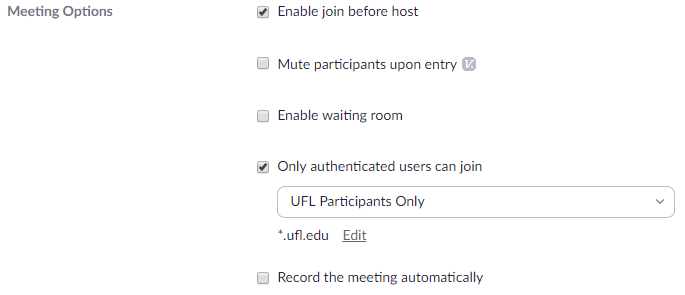
An additional feature that Zoom provides for restricting meeting participants to authenticated users has just gotten better. You can now choose to allow UFL Participants Only when creating a meeting invite. This change does not impact any defaults or current meeting settings. It simply enables the option, as displayed here, in your user profile.
You do have to shutdown your Zoom and Outlook clients and reopen them for these features to become available.
Is your Zoom Meeting Safe?
With the increased self-quarantines, social distancing, and stay-at-home directives that is necessary during this time, UF, like most of the world, has moved online to get work done. The tool of choice at UF, and for many other places, for most online meetings has become Zoom. The utilization of Zoom.us has exploded due to the COVID-19 pandemic. As with any platform that sees such rapid expansion, the hackers and social misfits have found ways to make Zoom uncomfortable, to downright unusable, if the host hasn’t taken proper precautions to start a safe meeting.
A new term, zoombombing, has been coined to define the unwanted intrusion of an individual in a video conference call. Many times, especially if screen sharing is enabled for all participants, the intruder shows pornography or other disturbing images to all participants. Articles about this are popping up everywhere. The FBI has even placed warnings that hijackers are taking over school and business video conferences.
- https://www.forbes.com/sites/kateoflahertyuk/2020/03/27/beware-zoom-users-heres-how-people-can-zoom-bomb-your-chat/#576edc94618e
- https://techcrunch.com/2020/03/17/zoombombing/
- https://www.zoom.com/en/blog/new-ways-to-combat-zoom-meeting-disruptions/
- https://www.businessinsider.com/zoom-setting-avoid-trolls-control-call-with-waiting-room-2020-3
- https://www.techrepublic.com/article/fbi-warns-about-zoom-bombing-as-hijackers-take-over-school-and-business-video-conferences/ (link stopped working in 2026)
UFIT has created a Keep Zoom Secure website to provide best practices and setup guides for faculty, staff, and students using Zoom.us. The announcement of this new page has been included on the Keep Teaching page, https://ufl.zoom.us/, eLearning homepage and many other UF webpages… including a banner on Canvas itself:

The basic tips the Keep Zoom Secure page discusses include:
- Generate a new meeting ID for each meeting (do not use personal rooms)
- Set a password for the meeting
- Disable join before host
- Enable Waiting Rooms to monitor entrants
- Prevent attendees from obscuring their identity (do not allow renaming)
- Turn off file transfer options
- Disable the virtual background
- Disable private chat
- Begin your sessions by limiting screen sharing to the host only
- Lock your session after it has started to prevent new users from joining
- Mute participants upon entry
- Disable annotations
- Don’t post your personal meeting ID on any public forums
The following information in our knowledgebase may also be helpful:
New KB About Forwarding Phones
Published today, how do I forward my VoIP phone if I am already working remotely?
Addressing HonorLock Privacy and Security Concerns
In light of moving classes online, a number of students have expressed their concerns about HonorLock’s terms of service and privacy policy. Honorlock is a tool that UF has enabled that records an exam session while allowing students to test at their convenience.
We’ve reached out to the Office of Distance Learning with your concerns and they have responded with the below statement. Any other questions should be directed to the Office of Distance Learning.
Dear Students,
My office understands and certainly appreciates the concerns you have expressed with regard to privacy and information security. Please be assured UF’s solution provider and partner in ensuring academic integrity – Honorlock – has passed a privacy and security evaluation by UF Risk Management and is held to all applicable FERPA (Family Educational Rights and Privacy Act) and GDPR (General Data Protection Regulation) requirements. I invite you to find these assurances detailed in the attached Honorlock Student Privacy and Honorlock GDPR documents and encourage you to share this information with anyone else who has similar concerns.
Additionally, here are some common privacy-related questions we have received from UF students in the past, along with responses from Honorlock:
- Student concern: Honorlock does not stop monitoring your screen activity once your proctoring session is over and this makes me feel uneasy.
Honorlock practice: As for recording/capturing, information after the exam is submitted, Honorlock is not capturing any data after the exam is submitted, only when the exam is in process. The student can also remove the extension right after the exam is submitted if they feel more comfortable.
- Student concern: The extension also has the power to censor your search results and even your right click function, regardless of whether or not you are taking a test.
Honorlock practice: We are not censoring the student’s search engine results; we are simply pushing back exam content by placing our websites on the first page of the search engines and by filing DMCA takedown requests to remove leaked exam content. These functions are not performed by the Chrome Extension and do not capture any data from the student.
- Student concern: Online reviews also mention that the extension even has the power to control other devices on the same internet connection.
Honorlock practice: Honorlock has no access to other devices in the network; it simply interacts with the student’s browser and the only page it interacts with is Canvas.
Again, I can assure you as a function UF’s service agreement with Honorlock, they are beholden to FERPA, 20 U.S.C. Section 1232g of Federal Code related to the kind of privacy issues you have brought to our attention.
Please let me know if I may provide any more clarification or if you have more questions. Feel free to give me a phone call to discuss this, if you wish. We are here to support and assist you while ensuring the academic integrity of the University is upheld.
Again, your concerns are important to us and we appreciate your understanding in this matter.
Brian
Adobe Changes to Single-Sign-On (SSO)
Adobe announced a week or two ago free licensing to students because of the impacts that COVID-19 is having on schools and universities. UFIT has been working to bring that to campus. On Friday, March 20th, it was enabled. Student’s are able to use UF’s federated identity (the GatorLink) for authentication to adobe.com. This allows adobe.com to verify eligibility.
This change is now also impacting UF people that are participating in the UF enterprise-wide licenses for Adobe Acrobat or Creative Cloud. When starting an Adobe application you may see a Time has run out! popup saying that your subscription has expired.

Emails by Adobe were sent Monday, March 23rd, about migrating content from a personal ID (the Adobe ID’s we were previously using that are associated with the UF Enterprise license) to a federated ID. Software Licensing Services is also sending emails to all individuals with a UF purchased license with instructions.
These instructions are available at https://software.ufl.edu/adobe-changes and are basically:
- Close the popup if it happens
- Logout of the existing Adobe ID
- Login with your federated, single-sign-on ID (your Gatorlink@ufl.edu address).
Since most Enterprise users do not have data saved in the Adobe Cloud, migration of content from the ‘personal’ account to the ‘federated’ account as described in the email from Adobe is not really needed. However, if in doubt, choose to migrate your content.
To avoid issues, it is our recommendation to only do this if you are having issues with your Adobe product’s registration. Adobe’s internal processes do move slowly and it seems to be impacting users at different times.
Having Problems with MFA when logging into the VPN?
Some people are having issues trying to answer their multi-factor authentication check when signing into the UF VPN. This results in the signin timing out and not properly connecting. If that’s happening to you, we have the solution. Check the newest KB article:
Cellular Internet Access
As we have transitioned to working at home, one of the challenges that keeps getting reported is lack of Internet access (especially in rural areas). Here are two possibilities to help bridge the gap:
Cellular WiFi Hotspots.
Both AT&T and Verizon have cellular hotspot contracts with UF. The price is approximately $40/month (Verizon provides the necessary hardware for free and AT&T charges ~$150). Unfortunately, both providers are currently back-ordered.
Contact info:
| Company | UF Sales Rep | Phone | |
|---|---|---|---|
| AT&T | Joe Pazzelli | jp5031@att.com | (407) 403-2334 |
| Verizon | John Ivey | john.ivey@verizonwireless.com | (904) 891-5884 |
More information on these contracts can be found on the UF Procurement website at https://procurement.ufl.edu/contracts/cell-phones-and-wireless-communication-devices/
Cellular Tethering
Cellular tethering involves turning your existing smartphone into a WiFi hotspot. Currently many major carriers (AT&T, Sprint, T-Mobile, and Verizon) are already suspending data caps on cell phone usage for the next 60 days. You may be able to addon to your contract cellular tethering or hotspot capabilities. However, due to the large differences in cell phones and carriers you will need to work with your respective cellular provider to take advantage of this function.
IT Support in this Work-At-Home World
In accordance with the guidance from the University President and our Dean, all Engineering IT Support Offices are transitioning to remote support. IT workers will begin work-at-home starting Thursday, March 19th. You can continue to receive support from your IT office by submitting tickets through your unit’s website or support email address as documented at https://www.it.eng.ufl.edu/contacts.
Support tickets are the preferred method to insure requests are properly tracked during this time.
If you don’t know where to submit a ticket you can use the Engineering IT Support website’s “Enter a Ticket” page (https://www.it.eng.ufl.edu/support/enter-a-ticket/) and we will route your request to the most appropriate location.
We have also increased documentation within the Engineering IT Support’s knowledgebase and have created our own “Working Remotely” page to help inform the College about useful tools, information, and tips/tricks for working remotely. If you have a question or see something missing, please let us know and we can add it here to share across the Herbert Wertheim College of Engineering. These pages will be updated continuously through this period so check back periodically for new information.
Please bear with us during this incredibly disruptive and unprecedented time as we adjust to continue to help you accomplish the mission of the University. I thank you in advance for your patience and understanding and look forward to when we can get back to assisting you in our normal, day-to-day methods.
-Shawn Lander, HWCOE IT Director